When a disk fails in a RAID array, NAS or server, the replacement must fit the system – not only the capacity. Many systems only accept the exact model or a model with the same firmware family. Older arrays often run with drives that are no longer produced; we keep many of these models in stock.
What to compare
- Exact model and capacity – a replacement may not be smaller than the failed disk; even a few sectors less can make a RAID controller refuse it.
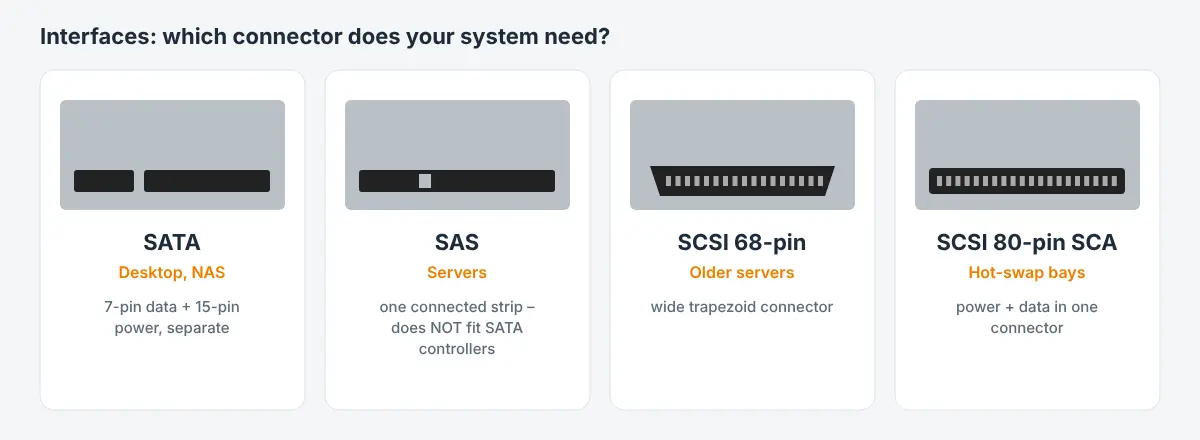
- Interface – SATA, SAS, SCSI (50-pin, 68-pin, 80-pin SCA) or IDE. SAS drives do not work on a plain SATA controller.
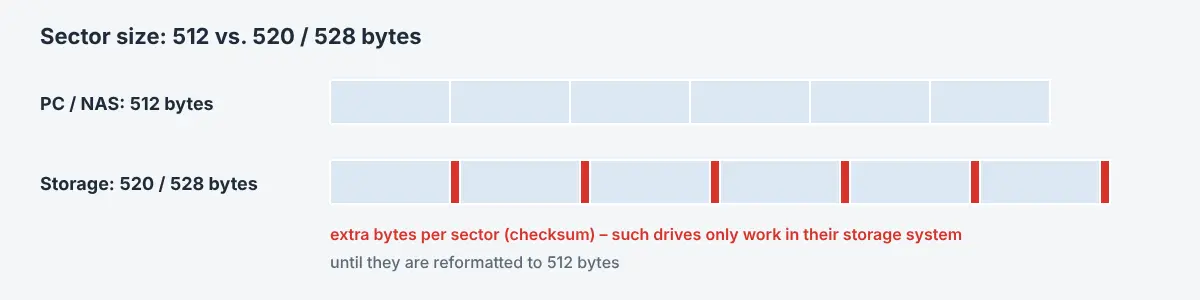
- Sector size – storage systems from NetApp, EMC, Hitachi or IBM often use drives formatted with 520 or 528 bytes per sector. They do not work in a normal PC or NAS without reformatting to 512 bytes – and the other way round, a standard drive does not work in such a system.
- OEM firmware – drives from HP, Dell, IBM/Lenovo, NetApp etc. have their own firmware and part numbers (e.g. HP spare/option numbers, Dell DP/N numbers). Some controllers only accept their own OEM drives.
- Rotation speed and cache – 5400/7200/10k/15k rpm; mixing speeds in one array slows it down.
- Form factor and tray – 2.5″ or 3.5″, and the matching drive caddy/tray for the server.
- SMR vs. CMR – for RAID and NAS prefer CMR drives; SMR drives can drop out of arrays during a rebuild.
Before you replace a disk
- Note the model, firmware and OEM part number of the failed disk (label and system log).
- If more than one disk shows errors, do not start a rebuild – the array may fail completely. Back up the data first or contact a data recovery lab.
- Check that the replacement is at least the same size and uses the same sector format.
We sell SATA, SAS and SCSI drives including many discontinued models and OEM versions. Search the shop for the exact model or send us the details.

 English
 Deutsch
 Français
 Italiano
 Español